View Time Card Report Archive Log
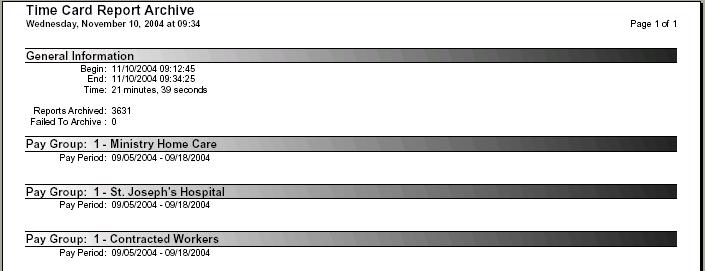
After the time card reports are archived, view the Time Card Report Archive report. This report summarizes any system error messages that may have occurred during the creation of the archive file. In the event an error does occur, the issue should be resolved and the archive recreated.
|
What Happens: |
The user is shown the Time Card Report Archive Report from the TCR archive performed in the previous step. The user has the option to accept or decline the report. |
|
Classification: |
Time & Attendance pay period close |
|
Step Type: |
Report |
|
Can Be Rerun After Accepted: |
Yes |
Processing Guidelines:
-
When no errors exist, select the Accept button to indicate the data reported is acceptable and to proceed with the next step.
-
The presence of an error message indicates the system encountered a problem with the creation of the report archive. These errors need to be reviewed. If the error can be resolved, select Denied to exit the screen and correct the error. The archive process needs to be completed again. In the event the error cannot be corrected, select Accept to continue.
-
Enter any pertinent Comments for this step.