Shift Fill Rate
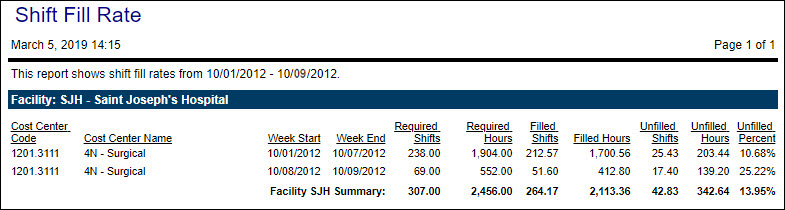
This report allows you to look for trends and evaluate staffing practices to determine how effectively Staffing and Scheduling is being used.
Note:
For this report, a shift is considered the same as a coverage period. The coverage periods are based on the organization unit’s default coverage set.
If a shift (or coverage period) is at 100% capacity or greater, it is a full shift. Less than 100% capacity is an unfilled shift. Capacity is taken in total for the shift. For example, if one or more profiles are understaffed by 20 hours and one or more profiles are overstaffed by 20 hours, the shift is considered fully staffed.
The report only displays data for organization units that have unfulfilled shifts at any point during the specified date range. If an organization unit is staffed to 100% or is overstaffed during the entire date range, it will not appear on the report.
The report displays the following information, grouped by organization unit and then by Week Start date:
-
Organization unit information
-
Start and end dates of the weeks included in your specified date range
-
Required Shifts and Required Hours
Indicates the sum of the needs and of the required hours during the week.
-
Filled Shifts and Filled Hours
Indicates the sum of the schedules and the scheduled hours during the week.
-
Unfilled Shifts and Unfilled Hours
Indicates the sum of the open schedules and the open hours during the week.
-
Unfilled Percent
This is the proportion of open shifts to required shifts. The formula is Unfilled Shifts divided by Required Shifts equals Unfilled Percent.
Example:
There are 28 shifts during the week. Of those, 22 are filled, leaving 6 unfilled. The Unfilled Percent is 21.43% (6/28 *100 = 21.43).
Report parameters include the following options
-
The organization unit or schedule group to include in the report.
-
The start and end dates of the range to include in the report.
Tip:
The data on this report is aggregated by the week. For this reason, it is suggested that you run the report for a date range that includes full (not partial) weeks.
Example 1:
-
Start Date: 1/14/2019
-
End Date: 1/16/2019 (three days)
-
Report data is grouped into one week, with three days of data.
Example 2:
-
Start Date: 1/14/2019
-
End Date: 1/21/2019 (eight days)
-
Report data is grouped into two weeks, with seven days in the first week and one day in the second week.
-
Sample report